
For group leaders
Leading an online group
Everything you need to run a book club, City Group or Bible study online. It takes about ten minutes a week.
Your weekly rhythm
Pictures are from a sample group; names and answers are made up.
Open your leader link
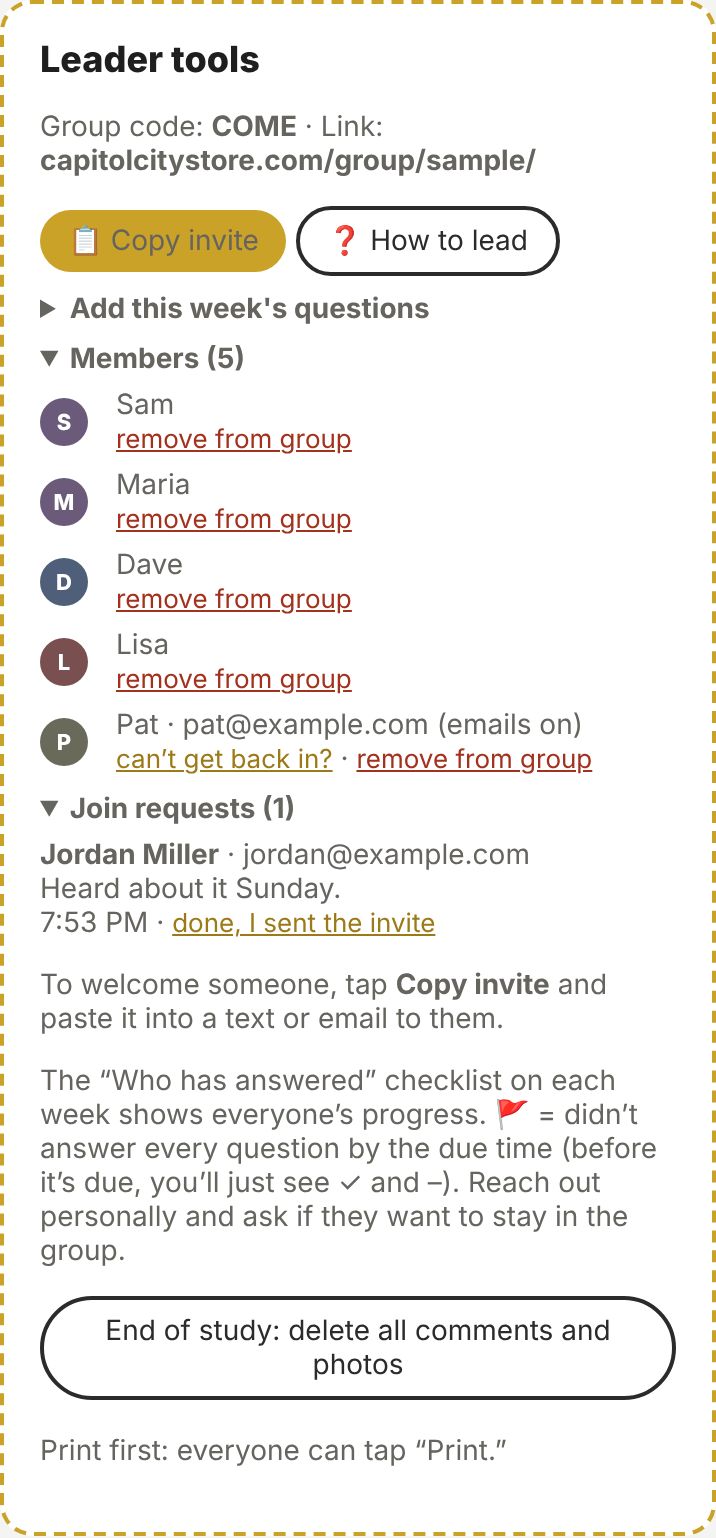
You’ll get a private leader link that ends in leader?key=…. Bookmark it, and don’t share it. It opens your group with the Leader tools box at the top: the group code, members and join requests, plus a ❓ How to lead button that brings you back to this page.
Welcome new people
When someone asks to join, they show up under Join requests. Tap 📋 Copy invite, then paste it into a text or email to them. It has the link and the code; that’s all they need. Then tap done, I sent the invite.
Post the week’s questions
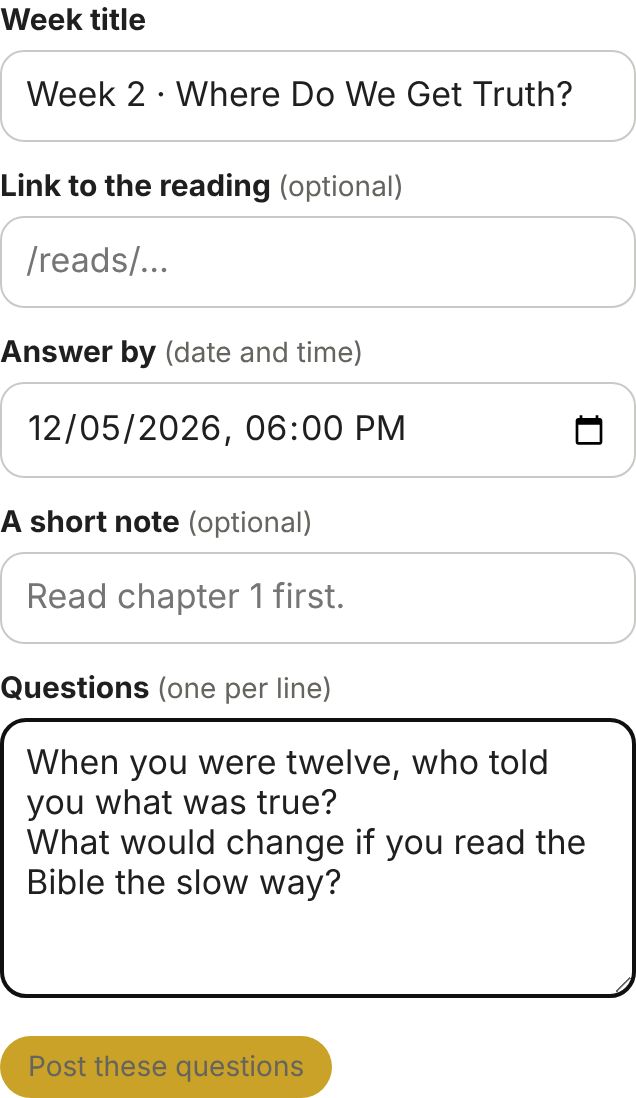
Tap Add this week’s questions. Type a title, pick the Answer by date and time, add a short note and type the questions, one per line. Tap Post these questions.
Book clubs are already set up: each chapter and its questions open on their own every Monday. You don’t post anything.
Answer first yourself
Model it. The first time you open your leader link, tap Join as myself so your answers count (you’ll get a Leader tag). Then answer every question within a day of the week opening. Short and honest beats long and polished.
Watch the checklist
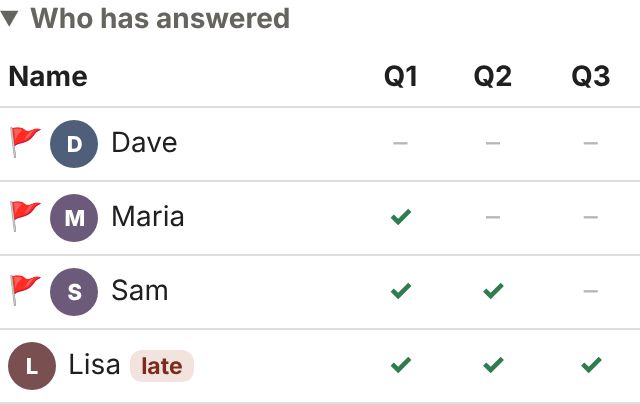
Everyone in the group sees who has answered. After the due time, a 🚩 marks anyone who didn’t finish.
Reach out personally within a day: “Missed you this week. Everything okay?” Then tap I reached out next to their name. If someone keeps missing, ask kindly whether they want to stay in the group. No lurkers, lots of grace.
Care for the conversation
Reply to people by name; tap Reply under their answer. A good follow-up question (“What helped?” “What’s next for you?”) keeps it going. You can delete any answer, reply or photo that doesn’t belong. If something personal comes up, take it offline and follow up privately.
Wrap up the study
At the end, remind everyone to tap Print or My answers to keep a copy. Then tap End of study: delete all comments and photos. It can’t be undone.
Your “This week” checklist
At the top of your leader tools you’ll see what a good week looks like. Pastor Rick sees the same list in his Monday report.
✅ You answered every question within a day of it opening
✅ Replied to people this week (3 or more)
✅ Reached out to everyone who didn’t finish
✅ Join requests answered within 2 days
Leading an in-person City Group? Leader Prep
Great groups start with a leader who has already wrestled with the questions.
• Each week’s questions show up there early, with a link to the leader guide. You’ll get an email when they’re ready.
• Answer every question yourself and write how you’ll open the discussion. Prep is due 24 hours before your group meets.
• You’ll get a reminder if you haven’t finished. Pastor Rick reads your prep so he can encourage and help you.
• Prefer paper? Tap Print on your prep page, write your answers by hand, then tap Photo of my notes and snap a picture. That counts as prepared. (No smartphone? Turn your written prep in to the church office 24 hours before group.)
When something goes wrong
You can fix all of these yourself from your leader link.
Someone got a new phone or is on a computer.
Tell them: open the group link, type the code, tap Find my name. If they joined with an email, they type it to prove it’s them.
They can’t remember the email they joined with.
Open Members, find their name and tap can’t get back in?. That clears their email. Now they can tap Find my name without it (and add their email again).
Someone lost the link or the code.
Tap 📋 Copy invite and send it to them again.
Someone wants out, or never takes part.
Talk with them first. If they’re leaving, open Members and tap remove from group. Their answers, replies and photo are deleted too.
A photo or answer doesn’t belong.
Tap Delete on any answer or reply. For a photo, open Members and tap remove photo. Then follow up kindly in person.
Someone joined twice.
Remove the extra name under Members. (The site won’t let two people use the exact same name, so ask them to add a last initial.)
People aren’t getting the emails.
Ask them to check spam or junk, and to add groups@capitolcitystore.com to their contacts. The emails are a bonus; the checklist on the page is always up to date.
I need the group opened, closed or the code changed.
Ask the church office. They can do it in a minute.
• Reminders go out by email the day before answers are due, only to people who haven’t finished.
• A daily note tells members when there are new answers or replies to them. It never says who wrote what.
• Groups are private and hidden from Google. First names only. Adults only.
• Questions or problems? Email Pastor Rick.